Shaking Head AI: price, photos, free options and FAQ
Updated:
Short answer
No subscription. Shaking Head is sold in packs: $8.99 for 1 video, $16.99 for 3 and $25.99 for 5. One video is 1 credit and makes a 7-second 720p close-up from one photo of a pet or an adult, with no watermark. Credits never expire, and every pack includes watch-only previews.
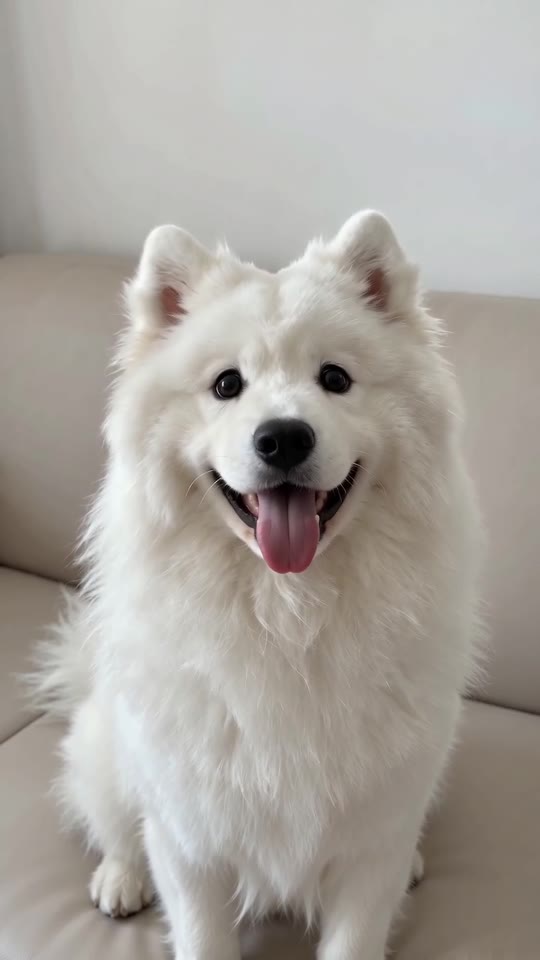
What 1 credit covers for a 7-second close-up
- Two rounds: a smug sway, a wide-eyed stare with the tongue out, the sway again and a second stare, 7 seconds at 720p.
- One subject: one pet or one adult per clip; places and outfits never change the price.
- Per clip: about $8.99, $5.66 or $5.20, depending on the pack.
A pack for the whole household
A pack of 3 or 5 covers every pet in the house: the cat on the bed, the dog on the sofa and you in the kitchen, each one credit. Credits also work on every other template on MimicZip.
Previews, refunds and renewals
Previews come with the pack and are not free: 1 with $8.99, 3 with $16.99 and 5 with $25.99. A failed generation returns its credit on its own. A pack you have not used can be refunded within 7 days; see the refund policy. Credits that made a finished clip stay spent, and nothing renews.
Is there a free Shaking Head AI video generator?
No. Shaking Head has no free version and no free preview on MimicZip. One finished 7-second 720p close-up from one photo of a pet or an adult costs 1 credit, and packs start at $8.99. Every pack includes watch-only previews for testing your photo. No subscription.
Free routes to a head shake
The cheapest way is to film your own cat or dog, which needs a calm animal, a steady phone and a lot of patience for the tongue. The sound is picked inside TikTok and costs nothing. A CapCut template for the trend has been circulating since 24 October; we have not checked what its free plan includes today.
What filming and templates rarely give you is a pet that never moved doing it: a photo of a cat asleep in a basket or a dog who will not hold still becomes the smug sway and the stare, which is what MimicZip makes from one photo.
What one Shaking Head run takes
- One photo: a single pet or adult, face toward the camera, eyes open, head and upper chest in view. Toys, drawings and children are not accepted.
- Included choices: 9:16 or 16:9, one of six places (your own background, bed, sofa, kitchen, armchair, garden), one of six outfits (your own, pastel hoodie, cream sweater, white tee, blue pyjamas, denim jacket) and a colour tone.
- Cost: 1 credit buys 7 seconds at 720p, with no watermark. $8.99 gets 1 video, $16.99 gets 3 and $25.99 gets 5.
- Previews: 1 with $8.99, 3 with $16.99 and 5 with $25.99. Each lasts 5 seconds at 480p, has a PREVIEW badge and cannot be downloaded.
Why it is a paid tool
Each clip comes from a paid AI video model. A failed run returns its credit automatically, credits never expire, nothing renews and an unused pack can be refunded within 7 days. MimicZip is independent and has no link to the accounts that posted the trend, TikTok or CapCut.
What photo works for a Shaking Head AI video?
Use one sharp, well-lit photo of a single pet or a single adult, with the face toward the camera, the eyes open and the head and upper chest in view, because the face fills the frame for the whole clip. Avoid two animals in one photo, sunglasses, heavy filters, toys and children. JPG, PNG or WebP up to 10 MB.
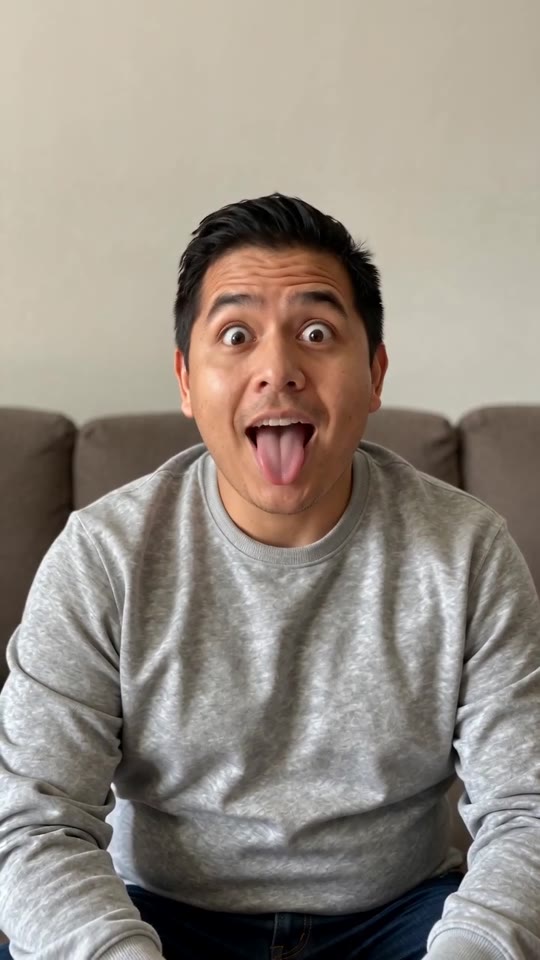
Photos that work
- One pet or one adult: your cat, your dog, a friend who agreed or you.
- Face toward the camera: the eyes should be open and easy to see.
- Head and upper chest: the body does not move, so there is no need for a full-length photo.
- Plain, tidy background: the place in your photo stays unless you pick another.
Photos to avoid
- Toys or drawings: this template takes adults and pets only.
- Babies, children or anyone under 18.
- Two animals or two people in one photo, celebrities or screenshots of someone else's clip.
- A face turned away, hidden by a paw or a hand, or covered by sunglasses or a strong filter.
Can I change the place or the outfit in a Shaking Head AI video?
Yes, from presets. Places: the one in your photo (the default), a cosy bed, a living-room sofa, a kitchen, an armchair or a garden. Outfits: what is in your photo (the default), a pastel hoodie, a cream knitted sweater, a white tee, blue pyjamas or a denim jacket, with a tiny version for a pet. You can also pick a colour tone. The sway, the stare and the timing stay the same, and every option costs the same.
Places
- Your photo's own place (default): the background, furniture and light stay as they are.
- Bed: a cosy bed with a plain cream duvet and soft grey curtains.
- Sofa: a living-room sofa with a beige throw and a floor lamp.
- Kitchen: white cabinets and a pale wooden table in morning light.
- Armchair: a cosy armchair with a knitted blanket and a warm lamp.
- Garden: green plants and a wooden fence, softly out of focus.
Outfits
- Your own (default): exactly what you or your pet wear in the photo.
- Pastel hoodie: plain, with no print.
- Cream knitted sweater: plain, with no print. A pet gets a tiny version of it.
- White tee, blue pyjamas or denim jacket: plain, with no print. A pet gets a tiny version.
Good to know
Only the defaults were tested on the examples. The other places and outfits use the same loop, so check a bonus preview first.
The colour tone is a third choice: natural (the default), warm golden, cool blue, soft pastel, vivid or retro film.
Questions people ask
Do credits expire?
No. Credits stay on your account until you use them.
Will I be charged again automatically?
No. Every pack is a single payment and nothing renews on its own.
Can I get a refund?
Yes, for an unused pack within 7 days. Credits that already made a video are not refundable.
What does a failed video cost?
Nothing. When a generation fails, its credit goes back to your balance automatically.
Do I need a credit card for the free preview?
No card is requested at login or when you add your photo, since there is no free preview. You pay once, at checkout, when you choose a pack.
Why does it say my free preview is used up?
Free previews are no longer offered on any account, so an old used-up message does not apply. Buy a pack and use its bonus previews to test the photo.
Is the preview long enough for both rounds?
Not quite. The 5-second preview runs the beats faster; the full 7 seconds hold two rounds of sway and stare.
Can I use a photo of a sleeping pet?
It works, but the eyes need to be open at least a little for the model to find them. A calm photo with the eyes open is safer.
Does the background matter?
Yes, because it is kept by default. A tidy sofa, bed or wall looks best; pick another place if yours is cluttered.
What size should the photo be?
Between 300 and 6000 pixels on each side, up to 10 MB.
Do the options cost more?
No. The price is the same for every option.
Will my pet wear clothes if I pick a hoodie?
Yes, a tiny plain version of it. Keep the default if you prefer the bare fur from your photo.
Can I type my own room?
No. The options are presets, which keeps results on trend and free of brands.
Make your own Shaking Head video
Upload one photo and make a 7-second HD video from $8.99. No subscription, and the full video has no watermark.
Make my video